Solitaire Real Money-Win Money
- 4.7
- Rating
- 1.00M
- Installs
- Free
- Price
 Analysis by App-foxy
I approached Solitaire Real Money-Win Money as a familiar card game with an important extra layer: the possibility of playing for cash prizes. That combination makes the app more demanding than an ordinary solitaire title. With a standard solitaire game, a slow screen or a confusing result is annoying; here, anything involving a contest, entry, or withdrawal deserves more care. My overall impression is that it can suit players who already enjoy classic solitaire and are comfortable treating the money element cautiously, but it is not the best choice if you only want a completely relaxed, distraction-free card game.
The game is developed by ASDGame and is free to install. It belongs to the card category, carries a Mature 17+ rating, and has built a substantial audience, with over a million installs, an average rating of 4.7, and around 82 thousand ratings. Those figures suggest that the basic concept is attracting plenty of players, but popularity should not be confused with a guarantee that every player will have the same experience. In my view, the most useful way to assess it is to separate the solitaire itself from the practical friction around playing for money.
Getting past the first points of friction
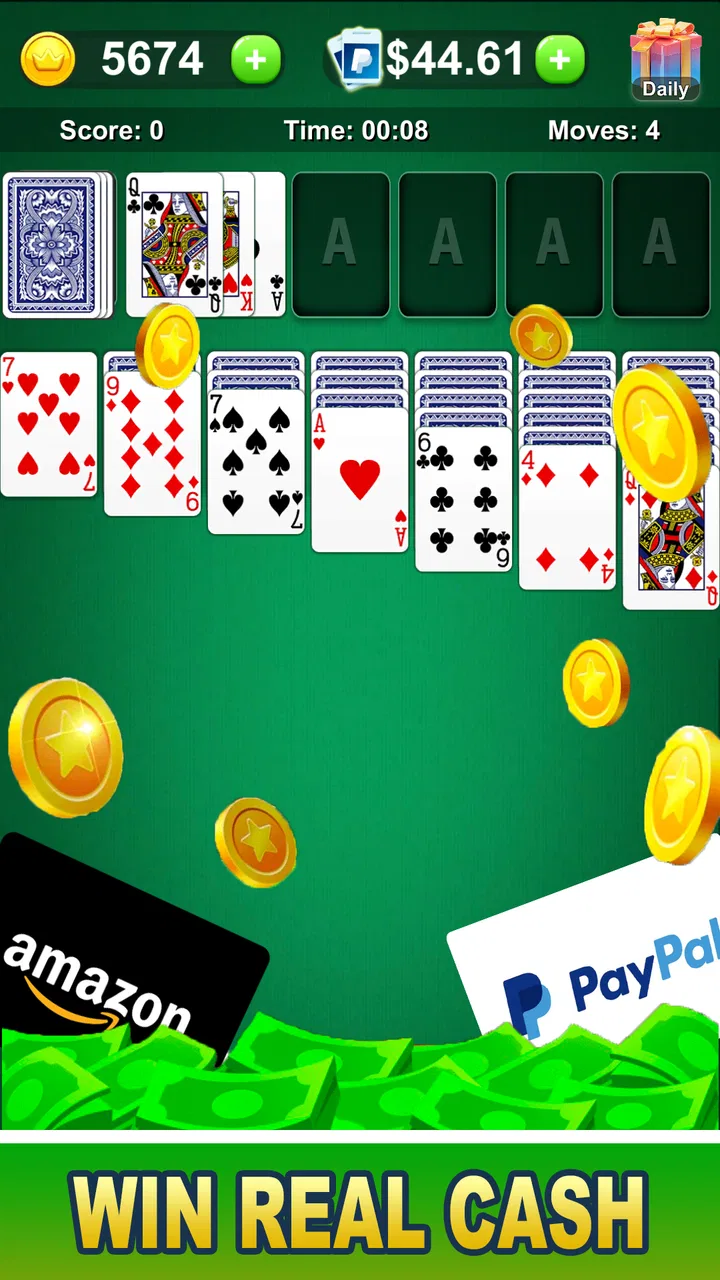
The first place I would expect a new player to get stuck is not the card layout. Most people who have played Klondike-style solitaire will understand the central idea quickly: arrange the tableau, expose hidden cards, and build the foundation by suit. The uncertainty comes from the surrounding screens. A player may wonder which area starts a normal game, which area relates to cash play, and whether an action is simply beginning a round or entering a more consequential mode.
You May Also Like

 Blood Strike: 2.5 Anniversary
Blood Strike’s Loadouts Turn Every Drop Into a Tactical Gamble
A close look at Blood Strike’s custom loadouts: how fast access to signature weapons reshapes its battle royale rhythm, rewards preparation, and narrows the gap between fights.

 Pandora - Music & Podcasts
Pandora’s Music Is Easy to Start, but Harder to Recover
Pandora’s strength is its low-effort path from a seed to a station. Its weak spot is how much confidence it asks you to place in connection, setup, and quiet recovery.

 8 Ball Pool
 Is Built on Rivalries, Rematches, and Routine
A close look at the rivalries, rematches, shared routines, and unanswered safety questions that turn a quick pool match into a persistent mobile community.

 Samsung Music
’s Quiet Strength Is Playing What You Already Own
Its reach comes less from spectacle than from dependable access to a personal library. That simplicity is both the app’s strongest retention engine and its ceiling.

 AccuWeather: Weather Radar
AccuWeather Review: A Quick, Clear Forecast for Everyday Decisions
For everyday plans, the best forecast is the one you can understand quickly. AccuWeather makes rain timing, radar, and local conditions easy to act on, with a few trade-offs.

 Hill Climb Racing
Why Hill Climb Racing Still Turns Crashes Into One More Run
A tiny car, a bumpy hill and one more upgrade: Hill Climb Racing keeps resurfacing because its simple chaos makes every near-miss feel personal.
More From Our News Desk



My advice is to slow down during the first session instead of tapping through every screen. Read the labels, look for the ordinary play route, and make sure you understand what the screen is asking before confirming anything connected with prizes. This is especially important because the short description presents the game as “Solitaire Real Money,” while the fuller store summary emphasizes cash prizes. The money angle is not a minor decoration, so I would not approach the opening screens with the same automatic rhythm I use in a basic offline solitaire app.
Another common sticking point is expectation. A player may install it for classic solitaire and then discover that the cash-focused presentation changes the mood of the game. The cards may still feel familiar, but the session is no longer only about improving a personal time or clearing a difficult layout. If you prefer to play while half-watching television or taking a short break, the extra attention required around contests can make the experience less comfortable than a traditional solitaire app.
There is also a practical difference between a game being free to install and every possible activity inside it feeling consequence-free. I would keep those ideas separate. “Free” describes the installation price; it does not tell me to treat every money-related choice casually. Before playing any mode involving prizes, I would check the wording on that screen, understand what is being requested, and avoid making a decision while distracted. That habit is more valuable here than rushing to start the first deal.
What I check before playing seriously
My first setup check would be the device itself. The listed minimum operating system is Android 5.1, so the game is positioned to support a broad range of Android phones and tablets. That does not mean every older device will feel equally smooth. A phone may technically meet the requirement yet still struggle if storage is nearly full, many background apps are active, or the operating system has been left without routine maintenance.
I would begin with a simple test: launch the game, move through the menus, start a non-money session if one is available, and play long enough to see whether cards respond consistently. If taps register late, the screen freezes, or the app closes, I would not immediately assume the card game is broken. I would first restart the app, close other demanding applications, and confirm that the phone has enough free space for normal operation. These are ordinary checks, but they prevent a player from confusing a device problem with an app problem.
Connection quality deserves similar attention. A classic card layout can look like something that should work entirely offline, yet the parts involving accounts, competitions, results, or cash-related activity may depend on communication with the service. If a screen loads slowly or a result appears incomplete, I would switch between a reliable Wi-Fi connection and mobile data only if that is practical, then reopen the relevant screen. I would avoid repeatedly tapping a confirmation button while a connection is unstable, because duplicate actions are exactly the kind of confusion a careful player wants to prevent.
Notifications and interruptions are another overlooked setup issue. A call, message, battery-saving mode, or automatic screen lock can break concentration during a timed or competitive round. Before starting an important session, I would charge the phone, keep the display from locking too quickly, and choose a place where interruptions are unlikely. This is not about making the game feel serious for its own sake; it is about avoiding a preventable mistake when the result matters to me.
I would also make sure the app is installed from the normal official store route and that the developer name shown there is ASDGame. That simple check helps avoid confusion with similarly named card games. If a download page, message, or pop-up asks for unusual information outside the normal app flow, I would stop rather than assume it is part of the game. A cash-related title deserves the same basic caution I would use with any service involving personal details or financial expectations.
How I organize a safer, clearer workflow
My preferred workflow is to learn the card handling first and think about prizes second. I would play several ordinary rounds, paying attention to how cards are selected, moved, undone, and confirmed. This matters because a player who is still learning the interface can lose a turn through an accidental tap rather than a poor solitaire decision. In a regular game that is harmless; in a competitive setting it can be frustrating and difficult to explain afterward.
Once the controls feel natural, I would decide what I actually want from the app. If my goal is simply to relax with solitaire, I would stay with the least demanding play option available and ignore the cash angle. If my goal is to explore prize-based play, I would read each screen carefully and set a personal limit before beginning. The limit should cover both time and money-related decisions. I would never chase a disappointing result by making a hurried follow-up choice.
A useful habit is to keep a simple mental separation between three stages: starting a game, completing a game, and checking what happened afterward. I would not close the app immediately after finishing if the result screen appears to require attention. I would allow the outcome to load, read the wording, and save any relevant confirmation in the normal way available on my device. If something looks delayed, I would wait and refresh carefully instead of repeating the same action several times.
This staged approach also helps when the app behaves unexpectedly. Suppose the cards stop responding halfway through a round. I would first note what I was doing, avoid forcefully tapping across the screen, and wait briefly. If nothing changes, I would close and reopen the game, then see whether the session state is restored. If the result concerns a cash-related activity, I would keep a record of the approximate time and what the screen displayed. I am not suggesting that every interruption can be recovered, only that a calm sequence gives me a clearer chance of identifying what happened.
One non-obvious trade-off is that playing on a larger tablet may make card movement easier, but a phone can be more convenient for short sessions. The better device is not automatically the more powerful one. I would choose the screen on which I can distinguish card ranks and suits without zooming or mis-tapping. For a game built around visual order, readability is part of performance. A cramped layout can make a familiar deal feel harder than it really is.
Recovering when a session goes wrong
When a game does not open correctly, I would work through the least disruptive fixes first. Restart the app, check the connection, restart the device, and then look for an available update through the official store. The current version is 2.2, so I would check whether my installation is current before spending time on more complicated troubleshooting. I would avoid clearing app data as an early step, because that can remove local information and may force me to sign in or configure the app again.
If only one screen fails while the rest of the game works, I would treat that differently from a total launch failure. A menu that refuses to load may point toward a temporary connection or service issue, while a game that closes as soon as it starts may be more closely related to the phone, storage, or installation. The distinction is useful because it tells me whether to wait and retry or to focus on the device. I would not keep repeating a money-related action simply because the first attempt did not produce an immediate response.
For a frozen card, I would first check whether the move was actually accepted. Sometimes a card appears unchanged because the interface is waiting for another selection or because the destination is not valid. I would tap once in a clear area, inspect the available controls, and then decide whether the problem is a rule misunderstanding or a genuine input failure. This small pause can prevent a chain of accidental moves.
If the app closes during play, I would reopen it and look for the session or result before starting another game. Beginning a new round immediately could make it harder to understand whether the previous one was recorded. I would also note whether the closure happens repeatedly at the same point. A one-time crash after a busy phone session calls for a different response than a repeatable failure on every launch.
For account or prize-related concerns, I would use the support route presented inside the app or its official store environment rather than relying on random advice from comments or unofficial pages. I would describe the exact screen, the action I took, and whether the issue happened on Wi-Fi or mobile data. Clear details are more useful than a general complaint that “the money disappeared” or “the game is stuck.” I would also avoid sharing passwords, verification codes, or sensitive financial information with anyone who contacts me outside the normal support process.
When the game may not be the real problem
Not every poor session is caused by the app. Solitaire depends on attention, and a player who is tired or interrupted will make more mistakes even when the controls work perfectly. In a cash-prize context, that matters more because frustration can tempt people to make another decision immediately. I would treat a bad result as a reason to pause, not as evidence that the next round must go better.
Network conditions can create misleading symptoms too. A slow connection may make a result screen look empty, while a phone with aggressive battery management may suspend the app in the background. Full storage can cause unusual behavior across several apps, not just this one. If other games or services are also freezing, I would investigate the device before blaming ASDGame’s title.
Display settings can play a part. Very small text, unusual scaling, or a screen protector that reduces touch sensitivity can make card selection feel unreliable. I would test the phone in another app and check whether taps land where expected. If the same problem appears everywhere, replacing the device or changing system settings may help more than reinstalling the solitaire game.
There is also the human factor of misunderstanding the objective. Classic solitaire alternatives often focus on clearing a deal at your own pace, while a cash-oriented version may place more emphasis on completing a round under particular conditions. If I enter a mode without understanding what counts as success, I can judge the game unfairly. I would read the instructions for that mode and make sure I know whether speed, moves, completion, or another visible condition affects the result.
This is where the app differs most from ordinary free solitaire. A simple alternative is better when I want unlimited practice, no pressure, and a predictable offline routine. A browser-based card game may be more convenient for someone who does not want to install anything, although it can be less comfortable on a phone. This app is more appealing when I specifically want the familiar solitaire format connected to the possibility of cash prizes and am willing to give the surrounding screens more attention.
Who I think will enjoy it
I would recommend trying it to an adult solitaire fan who understands that the money element changes the way the game should be approached. The Mature 17+ rating is a clear reminder that this is not a children’s card game. It is better suited to someone who can set boundaries, read instructions, and stop after a frustrating result rather than trying to recover it immediately.
It may also suit players who enjoy short, focused sessions. Solitaire naturally breaks into individual rounds, so I can play during a commute break, while waiting for an appointment, or at home after finishing other tasks. My realistic everyday scenario would be a ten-minute break in which I play a normal round, check the result, and close the app without turning the break into an extended chase for a better outcome. That kind of use keeps the game in its proper place.
I would skip it if I only want a quiet digital deck with no competitive or financial overtones. In that case, a conventional solitaire app is a better fit because its purpose is simpler and its workflow is easier to understand. I would also avoid it if I dislike reading conditions before starting a game, have unreliable internet for connected activities, or know that prize-based play encourages me to spend more time or money than planned.
My practical verdict after weighing the trade-offs
Solitaire Real Money-Win Money has a clear appeal: it takes a classic card format and gives it a prize-focused reason to play. The strong audience response, including a 4.7 average from around 82 thousand ratings and roughly 9.9 thousand written reviews, indicates that many players find the concept worthwhile. I see the app as more interesting than a plain solitaire clone, but also less carefree. Its value depends heavily on whether I want the added responsibility that comes with cash-related play.
The free installation makes it easy to test, and the Android 5.1 minimum means it is accessible to many older devices. Still, I would judge the experience on a properly functioning phone, a stable connection for connected screens, and a careful first setup. The most important practical tip is to learn the interface in low-pressure play before making decisions tied to prizes. The second is to treat a delayed screen as a technical problem to investigate, not an invitation to tap repeatedly. The third is to set boundaries before emotion enters the session.
ASDGame’s current version, 2.2, gives players a useful point of reference when checking their installation. If I encountered trouble, I would confirm that version, restart methodically, and use official support channels for anything involving an account or result. I would not rely on the rating alone, and I would not assume that every issue is caused by the game. Good troubleshooting here is as much about calm habits as it is about phone settings.
My final recommendation is conditional but positive. If you already like classic solitaire and want to explore a cash-prize format, this game is worth a careful trial. Play for the card experience first, and treat the money element as an added risk that requires clear limits. If your ideal solitaire session is completely private, offline, and consequence-free, choose a traditional alternative instead. For the right adult player, this app can make familiar deals feel more purposeful; for the wrong player, the extra friction will outweigh the novelty.
FAQs for Solitaire Real Money-Win Money
01What is Solitaire Real Money-Win Money?
Solitaire Real Money-Win Money is a mobile solitaire game that combines traditional card gameplay with the possibility of earning cash prizes or other rewards. Players generally compete in timed or score-based rounds, depending on the available game modes. Before downloading, check the current description, supported regions, age requirements, and reward conditions, as features and availability may vary by location and platform.
02Can I really win real money by playing Solitaire Real Money-Win Money?
The app may offer opportunities to win real-money prizes, but winnings are not guaranteed and usually depend on skill, ranking, tournament results, eligibility, and the specific rules of each contest. Some games may also include entry fees, advertisements, virtual currency, or promotional restrictions. Read the official terms carefully and never treat the app as a reliable source of income or spend more than you can afford to lose.
03How do withdrawals and payments work in the app?
Withdrawal methods, minimum payout amounts, processing times, and identity-verification requirements can differ according to your country and the version of the app. You may need to connect a supported payment account and provide accurate personal information before requesting a withdrawal. Review the payment policy for possible fees, tax responsibilities, geographic limitations, and conditions that could delay or prevent a payout.
04Is Solitaire Real Money-Win Money safe for children?
Because the game involves cash prizes or money-related competitions, it may not be suitable for children. Age restrictions, parental consent rules, and regional laws can apply, particularly where paid tournaments or gambling-like mechanics are involved. Parents should check the store rating, privacy policy, and in-app purchase settings, and should prevent unsupervised access to payment details or real-money features.
05Does Solitaire Real Money-Win Money require an internet connection?
An internet connection is typically required for account access, advertisements, competitive matchmaking, tournament updates, reward tracking, and payment processing. Although some solitaire rounds may appear to work offline, progress or winnings may not be recorded until the device reconnects. For the best experience, use a stable connection and confirm that mobile-data charges, login requirements, and server availability are acceptable before playing.
Pros
- Simple solitaire rules make it easy for beginners to start playing.
- Short rounds fit well into quick breaks or casual gaming sessions.
- Clear card layouts help keep gameplay easy to follow on mobile screens.
- Daily challenges can add variety beyond standard solitaire games.
- Progress and reward features may encourage regular play.
Cons
- Real-money features may not be available in every country or region.
- Withdrawals can require identity verification and minimum balance limits.
- Results depend partly on speed and skill
- which may favor experienced players.
- Advertisements or promotional offers may interrupt the free experience.
- Players should review fees
- eligibility rules
- and payout terms before depositing.

Solitaire Real Money-Win Money
Gallery